
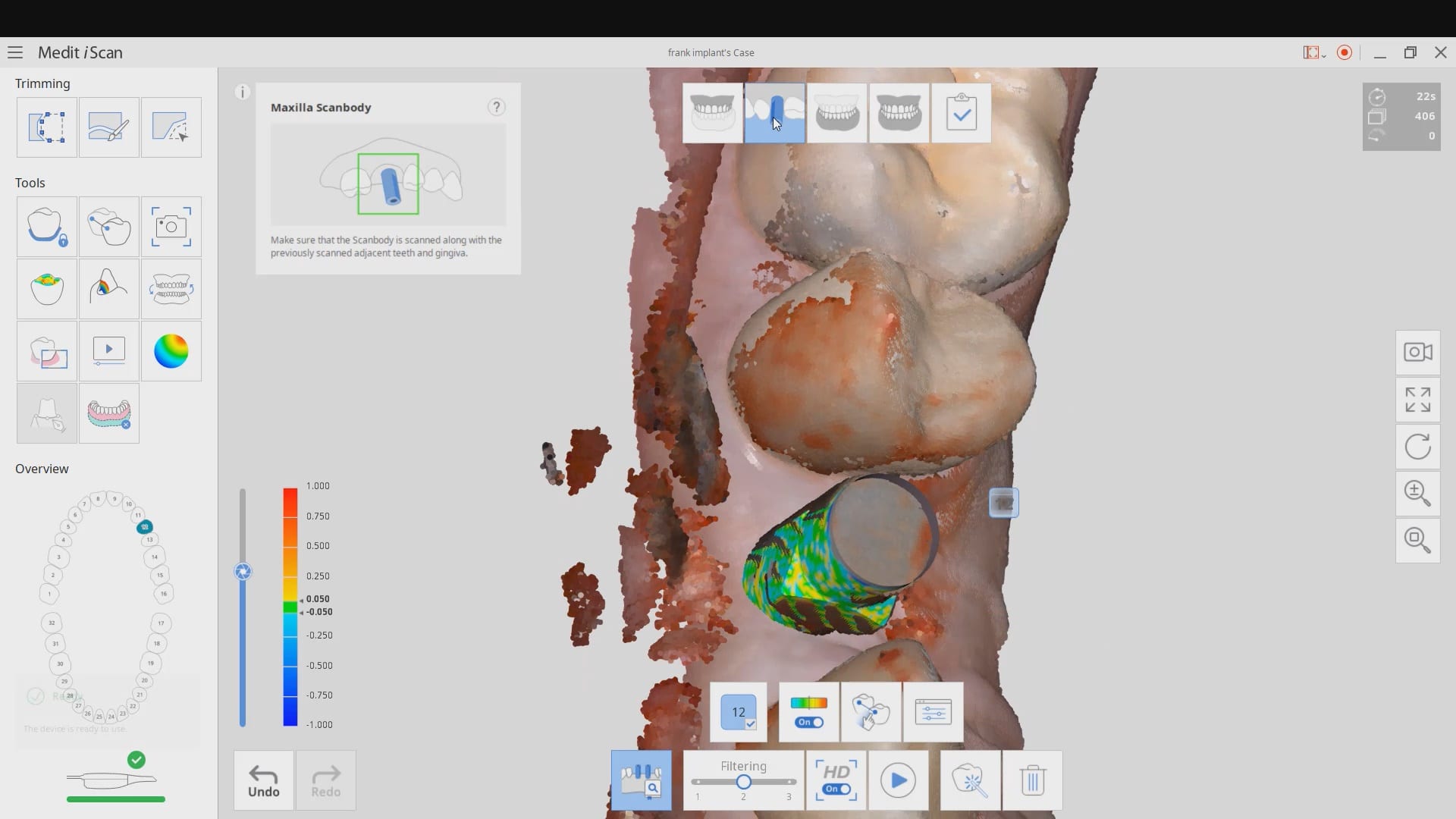
common problems when trying to image a scanbody with a bloody flap

 Sherif Gabr
 Se ve muy bien, aunque yo le tengo, pánico, a los Dentistas, Sorry, pero tengo que ir, Ni modo - 2/25/2015

 Page Barden
 Gould Dentistry
 Jose Morales
 Brandon Jones
 Mathew Rosinsky
Cad-ray has been awesome with support and training! I got the medit in 2018 and couldn’t imagine practicing without it! Armen and frank somehow seem to be available at all hours of the day, and I can typically have them remote in same day if I need a... read moreCad-ray has been awesome with support and training! I got the medit in 2018 and couldn’t imagine practicing without it! Armen and frank somehow seem to be available at all hours of the day, and I can typically have them remote in same day if I need any help. read less - 6/16/2020
Mathew Rosinsky
Cad-ray has been awesome with support and training! I got the medit in 2018 and couldn’t imagine practicing without it! Armen and frank somehow seem to be available at all hours of the day, and I can typically have them remote in same day if I need a... read moreCad-ray has been awesome with support and training! I got the medit in 2018 and couldn’t imagine practicing without it! Armen and frank somehow seem to be available at all hours of the day, and I can typically have them remote in same day if I need any help. read less - 6/16/2020
 Lake Shore Dental of Tempe
 Yoav Taub
 Kayla Dobmeier
 Aaron Olson
 Dath Collins D.D.S.
 Steven Hechtman
 Benjamin Polan
 Miguel DeLeon
 Gregory Camfield
 Varghese George
 Brandon Erickson
 Dixie Jernigan
 Eric Bailey
 Stuart Adam
Our office has been using the Medit scanner for a few months now and are loving it! CAD-Ray was super easy to work with in purchasing the scanner and providing support as needed. Their Facebook forum with the updates and video tutorials are incredibl... read moreOur office has been using the Medit scanner for a few months now and are loving it! CAD-Ray was super easy to work with in purchasing the scanner and providing support as needed. Their Facebook forum with the updates and video tutorials are incredibly helpful. read less - 6/16/2020
Stuart Adam
Our office has been using the Medit scanner for a few months now and are loving it! CAD-Ray was super easy to work with in purchasing the scanner and providing support as needed. Their Facebook forum with the updates and video tutorials are incredibl... read moreOur office has been using the Medit scanner for a few months now and are loving it! CAD-Ray was super easy to work with in purchasing the scanner and providing support as needed. Their Facebook forum with the updates and video tutorials are incredibly helpful. read less - 6/16/2020
 Christopher Chin
 Christopher Godla
 Nolan Andrews
 Jay Siddiqui
 Gunther Heyder
 David Forrest
Cad-ray has to be the best company to work with when it comes to digital dentistry solutions. Here are the reasons why:
David Forrest
Cad-ray has to be the best company to work with when it comes to digital dentistry solutions. Here are the reasons why: Blake Ferando
 Yen Tran
 Jordan Bower
 Stephen S
 Bracy Haynie
 Michael White
 Armen Mirzayan
 Jay Arnold DMD
 Shawn Van de Vyver
 Ted Fang
I bought my Medit I-500 from them. Everything has been been first class, from the training to the customer support. I highly recommend buying through CAD RAY. - 6/16/2020
Ted Fang
I bought my Medit I-500 from them. Everything has been been first class, from the training to the customer support. I highly recommend buying through CAD RAY. - 6/16/2020
 Jennifer Ebner
 Michelle Duong
 Micah Bickel
 Thomas Lim
 Iggy “Iggy” DeleonThomas Lim
 John Pobanz
 Preston Poole
 Collin Kwasnik
this video discusses some common problems you may encounter if you try and use the AI feature to identify a scanbdoy right after placement where you have a flap and a lot of bleeding in the field. It also demonstrates how to verify that the automatic stitching worked correctly and how to fix it. We also emphasize that you must not trim your TWO models to the point where there are no more common landmarks between them for the stitching to happen during processing
Collin Kwasnik
this video discusses some common problems you may encounter if you try and use the AI feature to identify a scanbdoy right after placement where you have a flap and a lot of bleeding in the field. It also demonstrates how to verify that the automatic stitching worked correctly and how to fix it. We also emphasize that you must not trim your TWO models to the point where there are no more common landmarks between them for the stitching to happen during processing
